Connecting Binance Exchange

Registration Binance (standard fees, high liquidity, there are almost all pairs), when registering through our link you will receive support from our community in solving any problems with the exchange, a simplified option to obtain VIP status, as well as maintaining the minimum price for our product (in case of price increases) https://accounts.binance.com/register?ref=OIVG3Z7V
1. On the CORNIX website, select Binance.
2. You will be offered 2 types of connection: “Quick Connect” and “Connect with API Keys”.
In the upper right corner, hover over the profile icon and go to the Toolbar.

Click Account on the left side of the menu, click Manage API in the drop down menu.
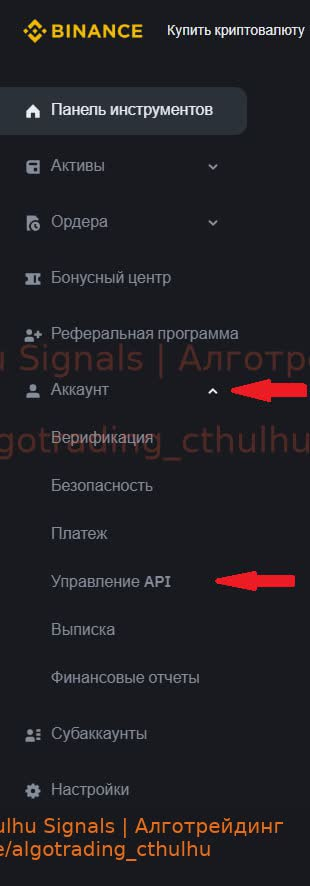
4. Click Create API and select System Generated, click Next

Make up any label for the API key
Before creating the API key, you will need to confirm it via phone/authenticator and mail.
After confirmation you will receive API key and secret key. Save the API key and secret key (after closing the Secret Key window it will be hidden).

6. In edit mode, select "Allow access to trusted IP addresses only (recommended)" and and paste the list of Cornix IP addresses we got from the Cornix website (click Copy):

Next you will be given the opportunity to select permissions, check the box “Include futures” and click Save

Confirmation via phone/authenticator and mail will be required again. Once confirmed, the API key will be active.
8. Select Binance Futures and paste the previously copied API key, Secret Key into the CORNIX window and click Connect to Binance, click Continue in the pop-up window
