May 23, 2025
Transfer Your Identity to New Account ByBit

1) Register a new account on ByBit using our referral link https://partner.bybit.com/b/cthulhu
2) Please note the following before proceeding with the identity transfer:
- The identity transfer feature will be available only 24 hours after KYC verification is completed
- You cannot re-transfer your identity for 180 days after a successful transfer
- The account to which the verified identity is transferred must have an unverified status
- Within 24 hours of identity transfer, withdrawals and use of fiat products will be restricted in the current and target account
- Withdraw all funds from the account to a new or third-party wallet before the KYC transfer begins
4) Transfer KYC to your new account:

- Step 2: Click on the Identity Transfer button on the Identity verification page.

- Step 3:To ensure the security of your account and funds, you will be required to complete some verification of your current account, such as facial recognition or a security verification code. Please ensure you have followed the instructions displayed on the screen.


- Step 4:Before starting the Identity Transfer, please make sure you have acknowledged the Terms and Conditions in the pop-up window and click on Continue.
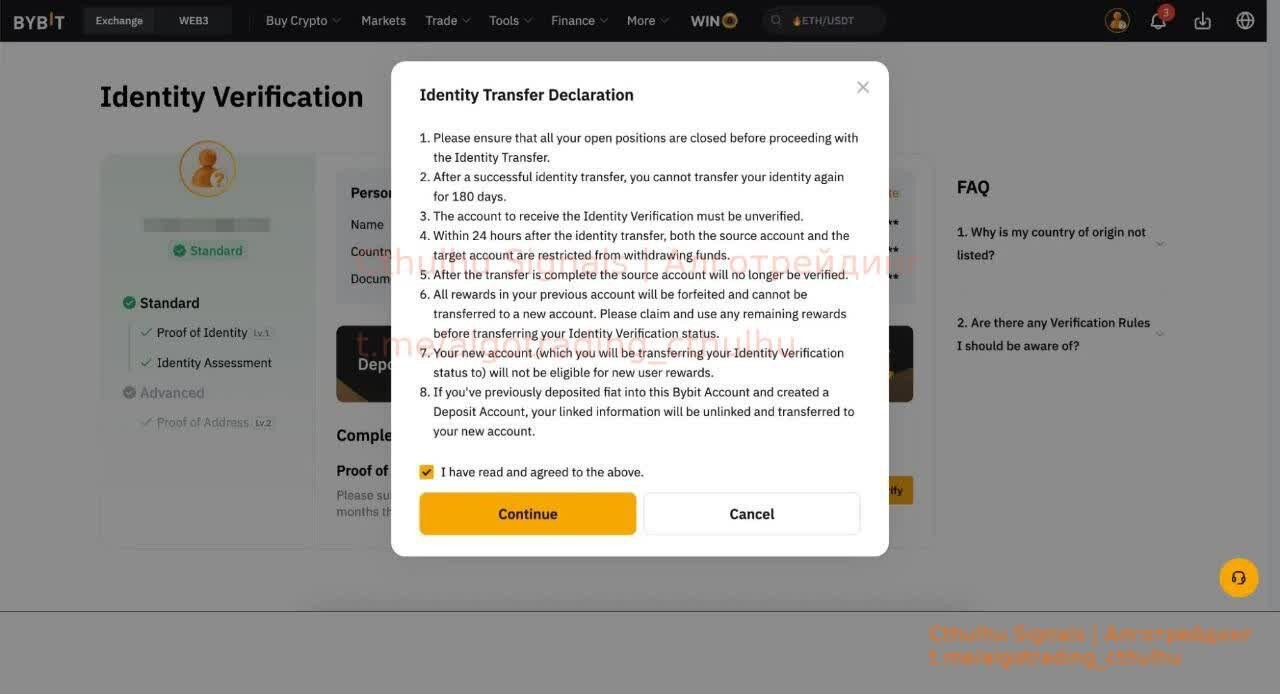
- Step 5: Make sure to fill in the correct registered email address or mobile number of the target account and click on Continue.


- Step 6: Complete the Security Verification by entering your verification code sent to the email address or phone number of your target account.

- Step 7: You will have successfully transferred the identity information to the target account after you have passed the verification. Your current account will return to unverified status.


If you already have VIP on any exchange, we can transfer it to your new account, email https://t.me/cthulhu_help
May 23, 2025, 08:24
0 views
0 reposts