TON Seed Converter
## Overview
TON Seed Converter is a user-friendly GUI application designed to generate TON (The Open Network) wallet addresses from 24-word seed phrases. It supports multiple wallet versions (W5/v5R1, v3R1, v3R2, v4R2) and provides a convenient way to process seed phrases stored in a text file.

## Features
- **Seed Phrase Processing**: Converts 24-word seed phrases into TON wallet addresses.
- **Supported Wallet Versions**: W5 (v5R1), v3R1, v3R2, v4R2.
- **Version Selection**: Choose specific wallet versions or process all via checkboxes (ALL option enabled by default).
- **File Input**: Select a seed phrase file (seed.txt) using a built-in file picker.
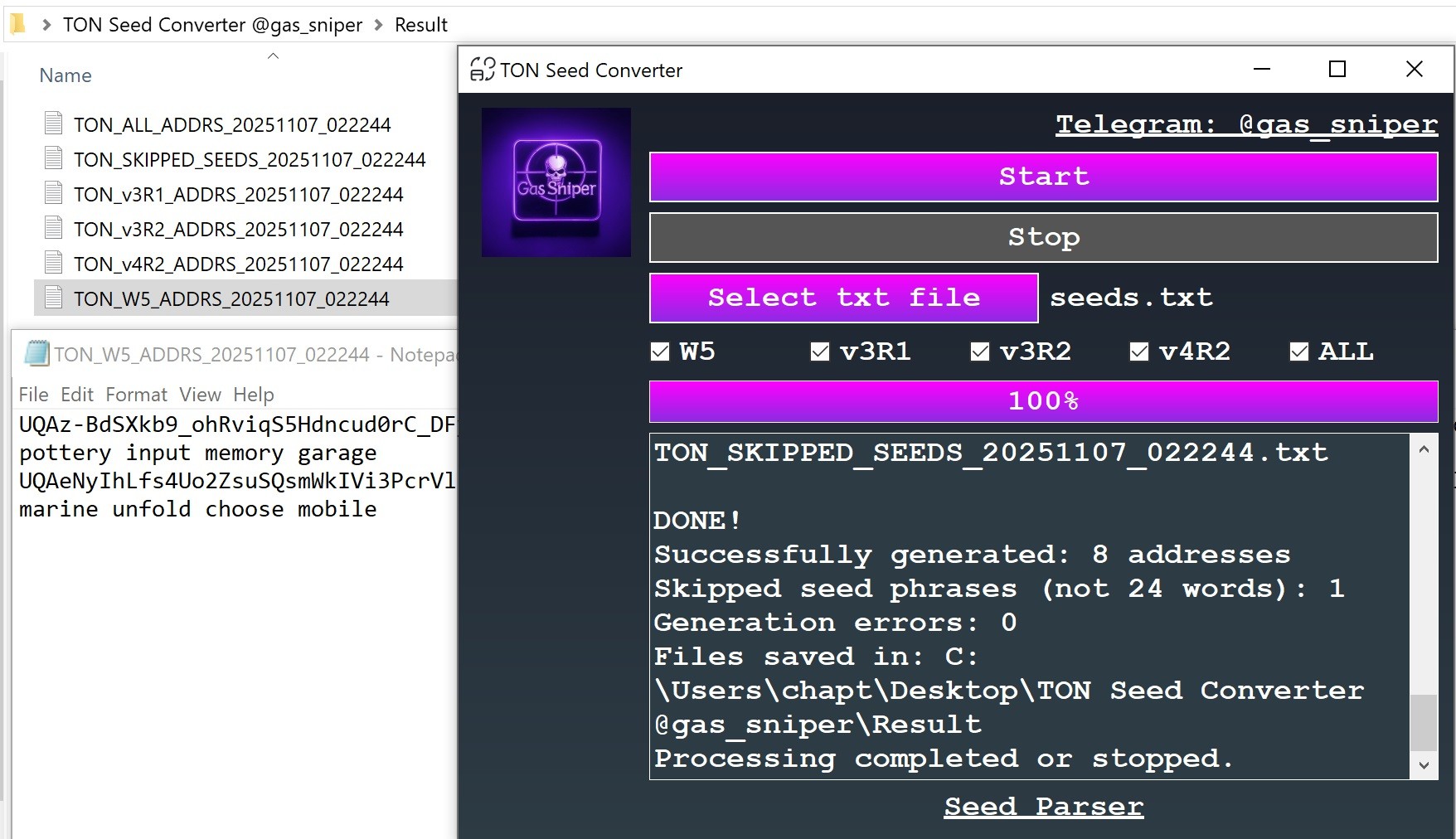
- **Output Files**: Generates separate files for each wallet version (e.g., TON_W5_ADDRS_{timestamp}.txt), a combined file (TON_ALL_ADDRS_{timestamp}.txt), and a file for skipped non-24-word phrases (TON_SKIPPED_SEEDS_{timestamp}.txt).
- **Progress Tracking**: Displays real-time progress with a progress bar and detailed logs.
- **Stop Functionality**: Allows interrupting the process at any time.
- **Result Storage**: Saves all output files in a "Result" folder created in the application directory.
## How to Use
1. **Launch the Application**: Run `TON Seed Converter.exe`.
2. **Select Seed File**: Click "Select txt file" to choose a `.txt` file containing seed phrases (one per line, 24 words each, e.g., `abandon ability ... actress add`).
3. **Choose Wallet Versions**: Use checkboxes to select desired wallet versions (W5, v3R1, v3R2, v4R2) or check "ALL" to process all versions (default: all selected).
4. **Start Processing**: Click "Start" to begin generating addresses. The progress bar and log window will show real-time updates.
5. **Stop (Optional)**: Click "Stop" to halt processing if needed.
6. **Check Results**: Find output files in the `Result` folder in the same directory as the executable:
- `TON_W5_ADDRS_{timestamp}.txt`: Addresses for W5 (v5R1).
- `TON_v3R1_ADDRS_{timestamp}.txt`: Addresses for v3R1.
- `TON_v3R2_ADDRS_{timestamp}.txt`: Addresses for v3R2.
- `TON_v4R2_ADDRS_{timestamp}.txt`: Addresses for v4R2.
- `TON_ALL_ADDRS_{timestamp}.txt`: All generated addresses.
- `TON_SKIPPED_SEEDS_{timestamp}.txt`: Seed phrases with non-24-word length.
Each file contains entries in the format: `address seed_phrase`.
## System Requirements
- **Operating System**: Windows (tested on Windows 10/11).
- **Dependencies**: Included in the executable. No additional installation required.
- **Input File**: A `.txt` file with 24-word seed phrases (BIP-39 compatible, lowercase, space-separated).
- **Internet**: Required for TON blockchain API calls (via ToncenterV3Client).
## Installation
1. Download `TON Seed Converter` from the official 👉🏼 Telegram channel
2. Place the executable in any directory.
3. Ensure your seed phrase file (e.g., `seed.txt`) is ready.
4. Run the executable and follow the "How to Use" steps.
5. There's NO NEED to disable your antivirus! This isn't a virus; you can scan the app with any antivirus before launching it!
## Notes
- Only 24-word seed phrases are processed. Non-24-word phrases are logged and saved to `TON_SKIPPED_SEEDS_{timestamp}.txt`.
- The application does not validate seed phrase authenticity beyond word count. Ensure your phrases are valid BIP-39.
## Updates and Support
For the latest updates, support, and additional tools, join our 👉🏼 Telegram channel
Related Tools: crypto tools, parsers, checkers, converters and etc
## LEGAL DISCLAIMER
The author of TON Seed Converter and other applications on the channel https://t.me/ai_wallets is not responsible for any misuse of this application. This tool is intended solely for work associated with your own private keys and seed phrases. Using this software to access or manipulate addresses, private keys, or seed phrases without explicit consent from their rightful owners is illegal and punishable by law. Use this tool responsibly and only with your own cryptographic assets. ⚠️ THIS TOOL IS MADE FOR EDUCATION PURPOSE ONLY ⚠️