Offline activation of the game Death Stranding
!!!ATTENTION!!!
- Be sure to disable Windows updates while playing the game. This is due to the fact that Denuvo remembers the entire system and RESETS ACTIVATION when it changes
- You can not enter online mode after offline activation, the maximum that you will get is not a working game!
- You can not switch to online mode after offline activation of the game, the minimum that you will get is not a working game!
Failure to follow these simple rules will result in a reset of activation, re-activation is paid! Its cost is $ 2.
⚠️ATTENTION! If you follow the instructions - no problems arise!
STEP 1.
Disabling Windows auto-update. You can also use the program to do this - Windows Update Blocker
STEP 2.
Create a new folder anywhere on your computer and call it "STEAMOFFLINE".

Download a file "Death Stranding.bat" and move it to the folder you just created "STEAMOFFLINE"
Log in file — https://drive.google.com/file/d/1nTX9YFbNfaq7SiGrAoTy3D0kigCwbD38
You must always run the steam client only through this file. For convenience, you can create a shortcut on your desktop.
Download the new Steam client from the official website. Next, install the new Steam client in the newly created folder "STEAMOFFLINE"

STEP 3.
Launch the file "Death Stranding.bat". Enter the received data and steam guard (one-time code). Don't forget to check the "Remember my password" box.

STEP 4.
Now you can go to the library and start downloading the game

STEP 5.
THE MOST IMPORTANT THING TO DO NOW!! After you downloaded the game to your computer.
- Start the game
- The main game menu appears
- Exit the game (this is IMPORTANT, you CAN not BE ONLINE FOR more than 3 MINUTES, the ACTIVATION will FAIL. Re-activation is paid)
If you need to change the language in the game, you need to do this before you switch the game to offline mode:
- Right click on the game in the Steam library and select Properties (In Russian - СВОЙСТВА)
- Go to the Language tab (In Russian - ЯЗЫК)
- Select the language you need from the drop down menu and click OK
STEP 6.
Switch your Steam to offline mode as in the photo (example below). The Steam autostart should be switched off!
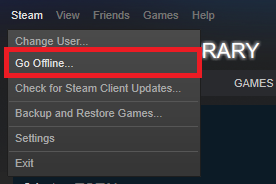
Activation was successful! Now you can start playing.
If you liked the service and instructions, please leave a positive feedback, I will be very happy. Thank you for your purchase!
SOME OF THE HIGHLIGHTS!
Log in to an account with offline mode strictly through the downloaded file Death Stranding.bat. In the window after opening, always select "Start in offline mode"

How do I log in to my personal Steam account after playing in an offline account?
Before you log in to your personal Steam client, you need to log out of the Steam client with offline activation ("Steam" at the top left - "Exit"). Never log out of your Steam account with offline mode. We issue Steam Guard only once! You must have two Steam clients (one you use for a personal account, and the other you use for offline mode. All as in the instructions). If you follow the instructions - No problems will arise! All reactivation is paid - the price is $2!
