Guide to Using the Haust Network Testnet and Haust NFT Sections
Adding the testnet to your wallet
- Add the network to MetaMask. The Haust Network documentation states that the testnet uses the RPC endpoint
https://rpc-testnet.haust.appand Chain ID1523903251. The network should be named Haust Network Testnet and its currency symbol is HAUST. In MetaMask select “Add Network,” enter these parameters and save. - Connect to the block explorer. After adding the network you can monitor blocks and transactions via the explorer
https://explorer-testnet.haust.app/. The explorer also offers an Add Network button that automatically configures MetaMask.
Receiving test HAUST tokens
Site: faucet.haust.app
- Open the faucet page and click “Connect Wallet.” Your MetaMask browser extension will prompt you to select the Haust Testnet and approve the connection.
- Once connected, a field appears for your address. Enter your wallet address and click “Request.” The faucet issues 1 HAUST per request as described in the documentation. Tokens arrive after the transaction is confirmed on‑chain.
- If necessary, repeat the request after some time (the faucet may limit frequency). Verify the tokens in MetaMask and in the explorer.
Using Haust DEX
Site: dex.testnet.haust.app

- Connect your wallet. On the DEX home page click “Connect Wallet.” Connect MetaMask and make sure the selected network is the Haust testnet.
- Swap tokens.
- Under Swap select the token you want to sell (for example HAUST) and the token you want to buy. Enter the amount in the Sell field.
- Adjust trade parameters such as slippage via the gear icon.
- Click “Swap,” confirm the transaction in MetaMask and wait for it to complete.
- Send tokens. Switch to the Send tab, choose a token and enter the recipient address. Enter the amount, click Send and confirm.
- Liquidity (Pool). The Pool section allows you to create or add to liquidity pools. Choose the token pair you wish to deposit, specify the amounts and confirm. Adding liquidity gives you LP tokens and a share of trading fees.
- Viewing pairs and history. The Explore tab shows existing trading pairs, volumes and fees. You can examine liquidity of various pairs and choose the most interesting.
The documentation stresses that you must use the test DEX dex.testnet.haust.app, connect your wallet and then perform swaps, add liquidity and send tokens.
Using the Haust Lend protocol
Site: lend.testnet.haust.app

- Connect your wallet. On the main page click “Connect wallet” and connect MetaMask to the Haust testnet.
- Supply tokens. Go to the Markets tab (if it is not already selected). Choose an asset to supply, such as WBTC or WETH. Click “Supply,” enter the amount and approve the transaction in MetaMask. Once supplied, your tokens begin earning interest.
- Enable as collateral. After supplying you can mark the asset as collateral, which allows you to borrow against it.
- Borrow. Click “Borrow” beside the token you want to borrow (stablecoins such as USDT/USDC are available). Enter an amount within your borrowing limit, confirm the transaction and sign.
- Monitor metrics. The Dashboard shows your net worth, positions, interest rates and the health factor. Monitor your collateral level to avoid liquidation.
- Repay and withdraw. To repay a loan click “Repay” beside the borrowed asset, enter the amount and confirm. To withdraw your deposit, click “Withdraw” beside the supplied asset and confirm.

The testnet instructions emphasize that you must open lend.testnet.haust.app, connect your wallet, supply tokens (e.g., WBTC/WETH) and then borrow USDT/USDC.
Overview of the nft.haust.network sections
1. Lifeform
The Lifeform section prepares users for the release of a “digital life form” (dNFT). It includes:
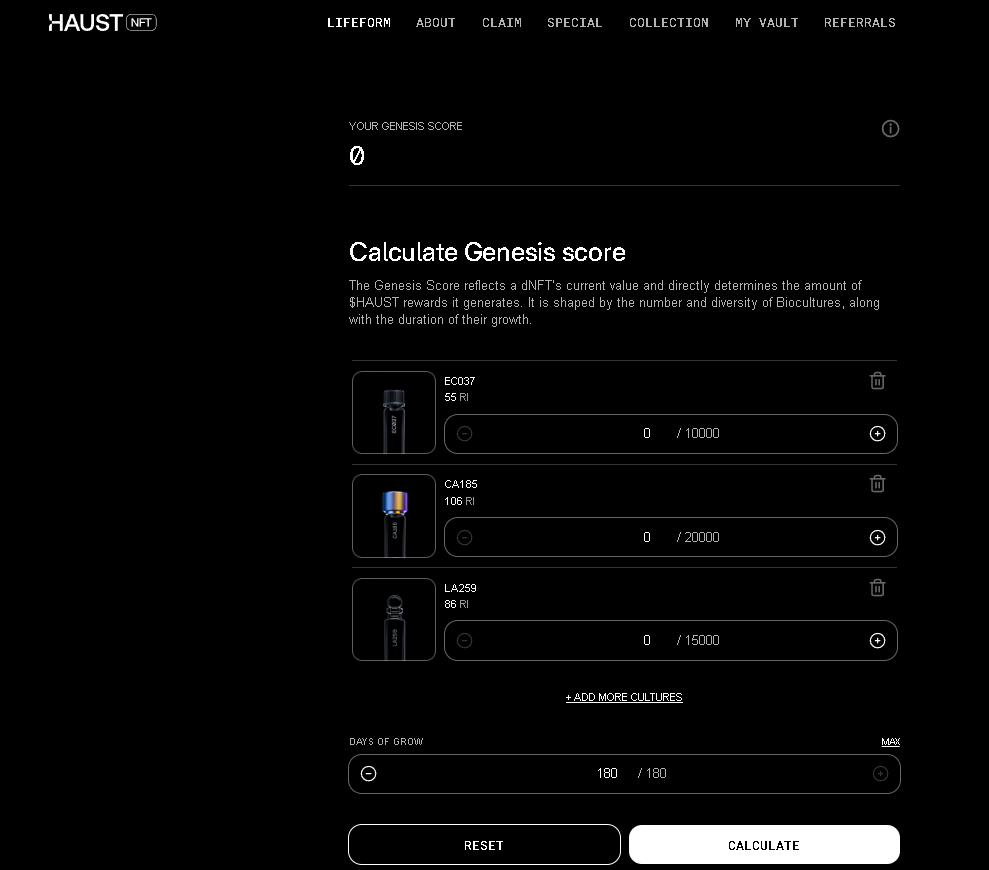
- Genesis Score (GS) calculator. This tool lets you plan the optimum number and diversity of Biocultures and their growth duration to maximize GS. The GS reflects a dNFT’s current value and directly influences future HAUST rewards nft.haust.network.
- dNFT creation plan. The description explains that you must first mint “Essentials” on the Haust testnet, then build Bioculture collections on the Base network, and after the mainnet launch connect your wallet and add Biocultures to your Petri Dish to create a unique life form.
- Evolution and maturation. A dNFT evolves over 180 days; its appearance changes as it matures. The more numerous and diverse the collections and the longer they grow, the higher the Genesis Score.
2. About
The About section describes the BioGenesis project and the structure of the experiment:
- BioGenesis Project. It is a digital experiment combining art, biotechnology and Web3 within the Haust ecosystem. Participants go through a multi‑phase journey, cultivating valuable NFTs and earning native tokens.
- Key stages. Slides labeled “Key stages” outline: (1) minting essentials (Petri Dish, Nutrient Medium, Lab Kit) on the Haust testnet; (2) building a unique Bioculture collection on the Base network; (3) minting a unique life form after the mainnet launch; (4) boosting on‑chain activity and watching your life form grow; (5) receiving badge rewards and network privileges.
- Scoring system (ERS). The Scoring model section explains that each life form receives an Evolutionary Rarity Score (ERS) – a dynamic metric depending on the uniqueness of Biocultures, maturation time and use of mutagens. The longer the life form evolves, the higher its ERS. Unlimited cultures can be added, and mutagens reduce maturation time but do not increase the ERS.
- Badges and rewards. Finishing the experiment earns badges (e.g., Assistant Biologist) that unlock extra privileges. Two reward options exist: finish early and receive a reward based on ERS, or let the life form grow to maximum ERS for larger rewards.
3. Claim
The Claim section lists past Bioculture airdrops. At the time of visiting it highlighted the MT333 series, showing its name, contract on the Base network and a link to the Base block explorer. The note explains that the claim is closed and new releases should be tracked via Twitter and Telegram or purchased on marketplaces like OpenSea.
4. Special
Special is an influencer program:
- Access to the exclusive Bioculture K000 is granted to Twitter users with more than 5 000 active followers.
- The total supply is 1 000 NFTs, with one NFT per wallet.
- Participation requires connecting a Twitter account, following Haust Labs and quoting/mentioning three key opinion leaders. Holding the NFT grants future rewards, private raffles and deeper collaboration.
5. Collection
The Collection page lists all Bioculture series and their status:
- Each series (MT333, PA148, CP296, SC222, LA259, CA185, SA074, EC037, etc.) is marked ended with a Buy on OpenSea button, indicating that sales have concluded nft.haust.network.
- The K000 series is marked live, with a Get allocation button for joining the special program.
- At the bottom are the “Essentials”: Lab Kit, Nutrition Medium NM000 and Petri Dish. Each has a Mint button linking to
petridish.haust.network, where users mint the necessary items for the experiment.
6. My Vault
The My Vault section displays your NFT inventory. If your wallet is not connected the site asks you to connect MetaMask. After connecting you will see the Biocultures, Essentials and other NFTs you own and can manage them.
7. Referrals
The Referrals section is meant for the referral program. The page also prompts you to connect a wallet. Once connected you should receive a personal link to share with friends. Participation likely influences ranks or rewards in BioGenesis.
Conclusion
The Haust Network testnet provides convenient infrastructure for the future Haust blockchain. After obtaining tokens from the faucet and connecting MetaMask, you can swap tokens on the DEX, supply and borrow assets in the Lend protocol and take part in the BioGenesis experiment – from minting lab equipment to creating a unique dNFT. The sections on nft.haust.network describe the experiment in detail, include a Genesis Score calculator, influencer programs and Bioculture collections. Together they offer a hands‑on way to become familiar with Haust Network mechanics and prepare for the mainnet launch.