July 14
ПРОМТЫ для SEEDANCE 2.0 и Gemini OMNI Flash (Часть 2)
Seedance 2.0
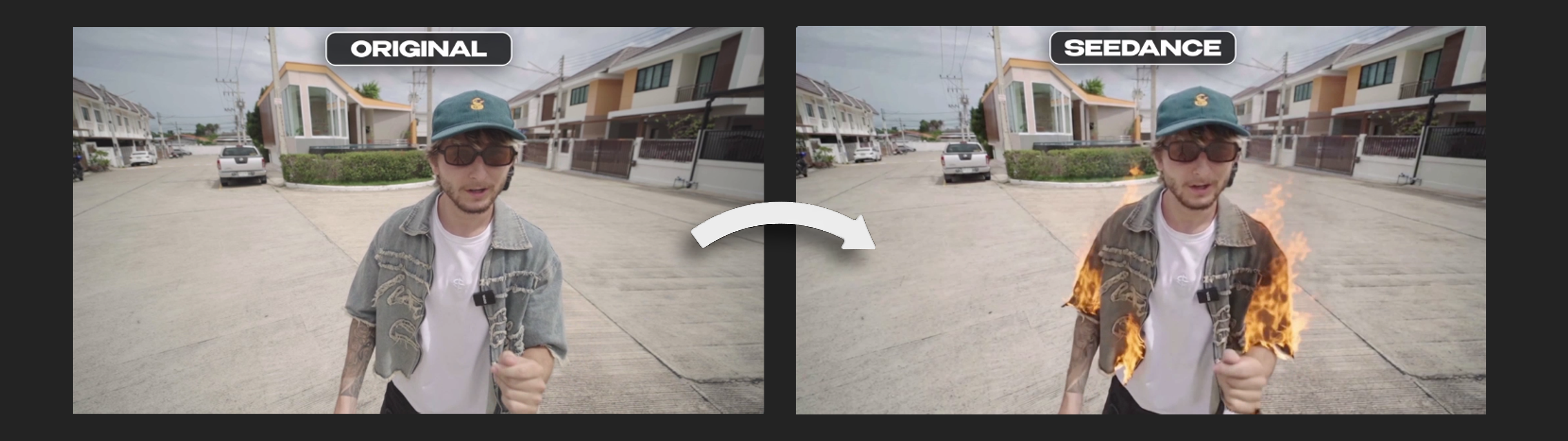
Reference hierarchy: <<< @Video 1 >>> drives everything — camera movement, camera angle, lens, framing, character motion, timing, and audio. Copy all of it as-is. Do not reinterpret, do not re-block, do not change pacing. PRESERVE EXACTLY (copy as-is from <<<video_1>>>): Camera path, angle, lens characteristics, focal length, and all camera motion — unchanged Character position, body movement, gestures, and timing — unchanged Face, identity, head position, and lip movement — unchanged (do NOT alter lip sync) Audio track — unchanged (do NOT modify sound) Background, environment, and all other subjects — unchanged Original color grade and overall lighting direction — unchanged The white t-shirt underneath stays completely intact, clean and unburned — no fire, no scorch marks, no smoke on it. SINGLE MODIFICATION — only the outer denim overshirt (the grey-blue washed denim jacket-shirt worn open over the t-shirt) is on fire, entirely: The denim overshirt burns with real, physically-based flames across its entire surface — both front panels, collar and sleeves — wrapping around the fabric and following its folds and the character's movement. Photorealistic combustion: flickering orange-yellow flame tongues, glowing embers along burning edges, thin rising smoke, visible charring and blackened, curling fabric edges progressing across the denim, small flakes of grey ash breaking off and drifting down. Fire reacts naturally to the character's motion and any air movement — flames trail and flicker with momentum. Correct global illumination: warm flame light spills onto the character's skin, neck, jawline, and surroundings; realistic bounce light and warm GI on nearby surfaces. Accurate reflections and specular highlights from the flames on skin, sweat, and any reflective surfaces in frame. Dynamic flame-driven shadows shifting with the fire. Keep the fire fully integrated into the original lighting — it is an added light source, not a filter. Everything except the burning denim overshirt stays identical to <<< @Video 1 >>>.
Gemini OMNI Flash

Transform his t-shirt, shorts, shirt, cap and sunglasses into frosted crystalline glass, as if made of solidified liquid nitrogen: matte, translucent, icy-blue and white internal refractions, NOT see-through — opaque enough that no skin or body shape is visible underneath, like frosted bathroom glass. Cold nitrogen vapor continuously drifts and rolls off the surface of the clothing, catching the light. Subtle internal glow and light refraction inside the glass material, cracking/shimmering highlights as he moves. Do not change the camera movement, framing, angle or composition — the camera stays completely static, exactly as in the original video. Do not change the person's movements: keep every gesture, arm, hand, leg and head motion, facial expression and lip movement exactly as in the original, with the same timing and duration. No dialogue, no speech, no new sounds from the person. No scene cuts — single continuous shot as in the source. Do not re-time or trim anything. Keep everything else the same.
Seedance 2.0

Add a large, realistic, diverse crowd of many people into the scene, of different ethnicities and ages, walking briskly and purposefully past and around him in different directions, as if in the middle of a busy New York City street — natural pace, natural spacing, believable depth and overlap between people closer to camera and further in the background. The crowd is added ON TOP of the existing scene: the location, environment, background architecture and lighting stay exactly as they are in the source — nothing currently in the frame is removed or altered, only people are added into it. He must remain clearly visible and unobscured in the frame at all times. This is a crowd-addition edit only. Treat @video1 as locked source footage, not a creative reference. Preserve one-to-one, frame by frame, with no reinterpretation: - the person's identity, face, facial expressions and exact lip movement; - all body motion: arms, hands, fingers, legs, head — every gesture exactly as in the source, same speed, same timing; - the camera: completely static, zero movement, exactly as in the source — no pan, no tilt, no push, no shake, no reframing, no zoom out to fit more people; - the background, environment and lighting exactly as in the source; - shot duration, pacing and all timing. Do not re-time anything. Do not add, remove or change any dialogue, speech, words, voice or mouth movement. Do not change the location or lighting. Do not stylize. Change ONLY: add the described crowd of people into the scene, in front of and around him, without covering him. Output duration equals source duration.
Gemini OMNI Flash

This edit is for adding pedestrians in the background only. Consider @video1 blocked source material, not creative reference. Add 35 pedestrians walking naturally past the main character. street, at a realistic distance, slightly out of focus, walking in different directions at a normal pace - the street should be busy and populated Save one to one, frame by frame, without re-interpretation: - human personality, face, facial expressions and lip movements; - all body movements: arms, hands, fingers, legs, head - every gesture exactly as in the source, the same speed, the same timing; - camera: completely static, zero movement, exactly as in the source; - the background architecture and lighting are exactly the same as in the source; - shot duration, tempo and all the time. Do not add, delete or change any dialogue, speech, words, voice or mouth. movement. Don't stylize. ONLY change: add the described background pedestrians to the empty parts. streets without touching or covering it. The duration of the output signal is equal to the duration of the source.
Seedance 2.0

Replace his current outfit with the outfit shown in @image1 (top, pants and shoes), matching the same garments, colors and proportions from the reference image. The new clothing follows the source body motion exactly, with realistic fabric folds and correct fit. This is a clothing replacement edit only. Treat @video1 as locked source footage, not a creative reference. Preserve one-to-one, frame by frame: the person's identity, face, expressions and exact lip movement; all body motion — arms, hands, fingers, legs, head — every gesture exactly as in the source, same speed, same timing; the camera movement, trajectory, framing, angle, composition and shake — copy the source camera exactly; the background, lighting and duration. Do not re-time anything. Do not add, remove or change any dialogue, speech or mouth movement. Do not add new objects, people, gestures, camera moves or scene cuts. Do not stylize. Change ONLY the clothing (top, pants, shoes) as shown in @image1. Output duration equals source duration.
Gemini OMNI Flash

Replace his current outfit with: a black full-zip track jacket with a Lamborghini bull-shield logo on the left chest, relaxed loose fit; matching oversized charcoal-black jogger sweatpants with drawstring waist and the same Lamborghini bull-shield logo on the thigh, baggy relaxed fit tapering slightly at the ankle; and chunky metallic blue sneakers with a glossy iridescent finish. His cap and sunglasses stay exactly as they are — do not change them. The new clothes drape and move naturally with his body, matching real fabric weight — soft technical shell for the jacket, heavier cotton fleece for the sweatpants. Lighting on the new outfit matches the original scene's light direction and color exactly. Do not change the camera movement, framing, angle or composition — the camera stays completely static, exactly as in the original video. Do not change the person's movements: keep every gesture, arm, hand, leg and head motion and facial expression exactly as in the original, with the same timing and duration. No scene cuts — single continuous shot as in the source. Do not re-time or trim anything. Keep everything else the same.
Seedance 2.0

This is an on-top visual-effect edit only. Treat @video1 as locked source footage, not a creative reference. SINGLE MODIFICATION — a bright green holographic 3D city rises up from the phone screen, starting exactly at the moment he snaps his fingers. All buildings begin growing upward at the same time, immediately after the snap, extruding straight up from the screen surface simultaneously — not one after another — reaching full height within about 3 seconds. The city is a solid 3D object standing directly on the phone screen, like a physical miniature model resting on a table. It has correct 3D perspective and parallax between near and far buildings, and it tracks the phone's exact position, tilt and rotation in his hand in real time — as the phone rotates or tilts, the hologram rotates and foreshortens with it exactly like a rigid object glued to that surface. It never floats, drifts, or behaves like a flat 2D image or sticker overlaid on the screen — it must look physically locked to the screen plane, casting its own small holographic shadow/glow onto the screen edge. The hologram is bright green, glowing, semi-transparent holographic light with fine scan-lines and floating light particles, volumetric glow casting soft green light onto his hand, the phone and his face. Preserve one-to-one, frame by frame, with no reinterpretation: - the person's identity, face and facial expression; - all body motion: arms, hands, fingers, legs, head — every gesture exactly as in the source, including the snap itself, same speed, same timing; - the camera: completely static, zero movement, exactly as in the source; - the background, environment and lighting exactly as in the source; - shot duration, pacing and all timing. Do not re-time anything. Do not add, remove or change any dialogue, speech, words, voice or mouth movement. Do not add new objects, people or camera moves. Do not stylize anything outside the hologram effect. Change ONLY: add the described green holographic city effect rising from the phone after the snap. Output duration equals source duration.
Gemini OMNI Flash

A bright blue holographic 3D city is already visible and actively growing on the phone screen starting from the very first frame of the video. There is no trigger moment, no snap, no gesture, no flash and no light beam or ray connecting his hand, fingers or anything else to the hologram — it simply originates directly from the screen surface with no visible cause or activation effect. Buildings continue extruding upward from the screen throughout the shot, growing progressively taller until reaching full height by the end of the clip. The city is an ultra-detailed, photorealistic 3D object physically standing on the phone screen, like a real architectural miniature model resting on a table — not a flat image, not a sticker, not a 2D overlay. Each building has real volumetric geometry: distinct silhouettes and heights, visible rooftop details, individual glowing window grids, hard edges and clean holographic surface material with fine internal scan-lines. Buildings correctly occlude each other and cast small holographic shadows and light spill onto each other and onto the phone screen — real depth and parallax between near and far structures. The hologram tracks the phone's exact position, tilt and rotation in his hand in real time: as the phone rotates or tilts, the city rotates and foreshortens with it exactly like a rigid solid object glued to that surface — it must never float free, drift independently, or look pasted on top of the screen. The hologram is bright blue, glowing, semi-transparent holographic light, casting soft blue volumetric light onto his hand, the phone and his face. Do not change the camera movement, framing, angle or composition — the camera stays completely static, exactly as in the original video. Do not change the person's movements: keep every gesture, arm, hand, finger and head motion and facial expression exactly as in the original, with the same timing and duration. No scene cuts — single continuous shot as in the source. Do not re-time or trim anything. Keep everything else the same.