Instructions for registering an Xbox account and linking it to Epic Games [UPbucks INT]
If you're playing Fortnite from a PC and don't have an Xbox account, and you're buying B-bucks or bundles from us, you should do the following:
1. Go to https://www.microsoft.com/ and create an account. Your birthday MUST be chosen so that you are 18 or older.
Common Problem: It takes a long time to load the page after entering the code from the mail, then you need to go back and enter the code from the mail again. (This may take several times)
2. Once your Microsoft account is created you need to go to xbox.com, click login, then accept the agreement.

Linking your XBOX account to Epic
2. Click Login in the upper right corner and log in to your Epic Games account. (Sign in, just like you normally do.)
3. hover your mouse over your name and click Account.
4. Click on Connections and then select Accounts.
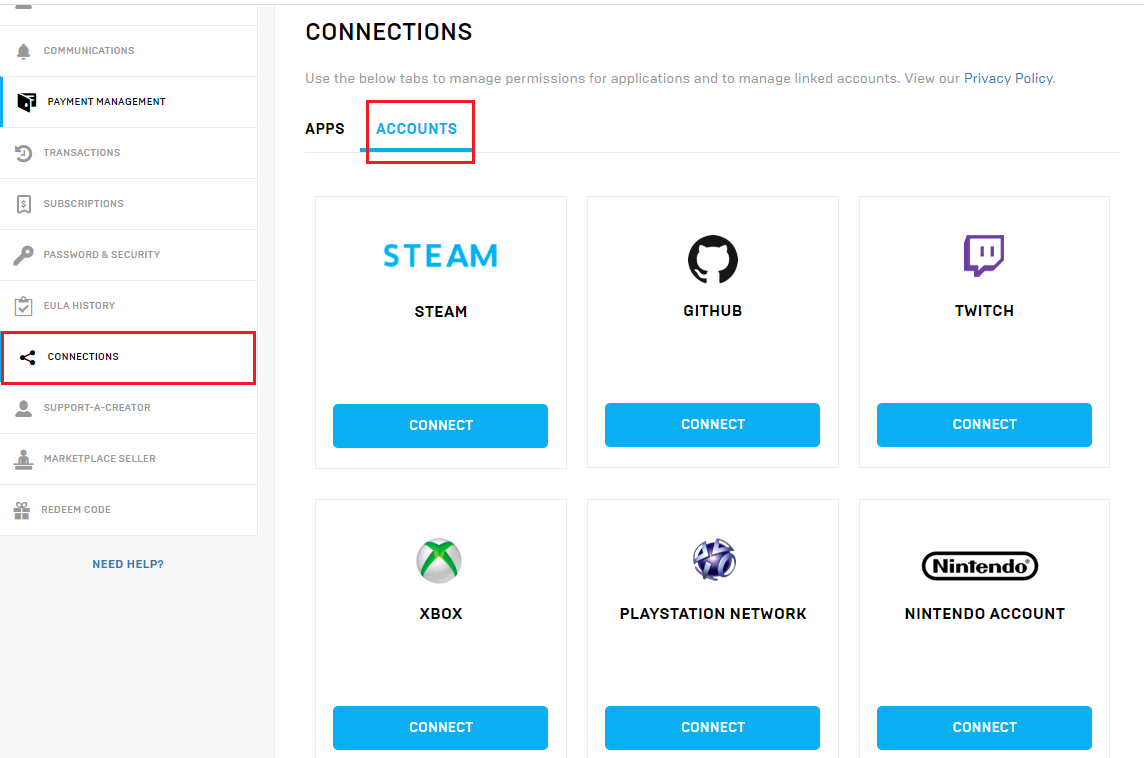
5. Click Connect next to the account you want to connect to your Epic account.

7. A pop-up window will appear. Log in to your XBOX account and connect
9. Your XBOX account is now successfully connected to your Epic Games account.

IMPORTANT!
1. If you are playing on a PlayStation, you must have a PSN account as well.
2. Make sure you have the correct XBOX account you are giving us, and that it is connected to the Epic Games account you are playing on. (If you make a mistake, we are not responsible for V-Bucks, Bundles, Subscription coming to the wrong account.)